Saturday, March 22, 2014

How to remove older/newer/home link from Blog


  1. How to remove Newer posts link ?
  • Go to Template << Edit HTML << and search for following code.
#blog-pager-newer-link{background:
  • Now just copy the below code and paste after/below the #222;float:left;padding:4px} .
#blog-pager-newer-link {display:none;}
And save it.
     2. How to remove Older posts link ?
  • Search for following code.
#blog-pager-older-link{background:
  • Now just copy the below code and paste after/beow the code #222;float:right;padding:4px}
#blog-pager-older-link {display:none;}
And save it.
      3.How to remove Home link ?

  •  search for following code.

.home-link {background:
  • Now just copy the below code and paste after/below the #222;float:left;padding:4px} code.
#blog-pager .home-link {display:none;}

And Save it.
Read More »

How to change font size of posts on blogger


  • Go to Template >> Edit HTML >> and search for ".post-body{" (without quot).
  • then you will see following code.

.post-body{margin:0px;padding:0px 16px 0px 0px;font-family:Arial, Helvetica, Sans-serif;font-size:15px;line-height: 20px;}
  • Now change 15 to your desired size.
Read More »

Thursday, March 20, 2014

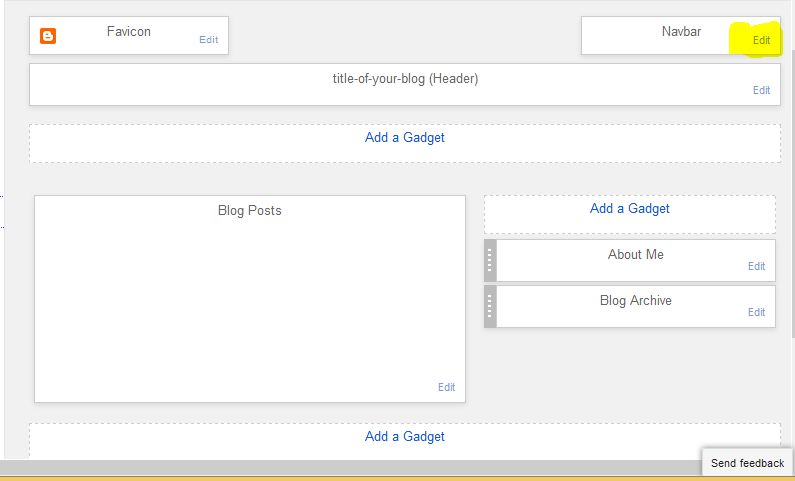
How to remove Navbar from blog

This is the tutorial of removing Navbar/Navigation from blog.

  • Go to Blogger Layout 
 click Edit on 'Navbar' 


New window will open then choose OFF option from the list and click on save.


ENJOY   !!!!!!!!!!!!!!!!!!!!!!!!!!!!!!!!!!!
Read More »

How to create the labels on post

  • Create a new post.


  • Now click on labels on the right side.


Now type a labels . labels should be separated with commas.Then click done and publish the post.

   ENJOY  !!!!!!!!!!!!!!!!!!!!!!!!!!!
Read More »

How to add html / java script on blogger

1. Log into your Blogger account. 

2. Once logged in you will need to click on "Layout"

3. Next you will need to decide where you would like to run Chitika ads on your Blogger site.

4. When you have the desired location you will need to click on "Add a Gadget"

5. You will then need to click on HTML/JavaScript to add JavaScript code to your site. 


6. This will bring up a new window that you can copy and paste the ad code you have generated from the publisher panel into the "Content section." Once you have the code in this window you will need to click save.


7. Next you will need to click "Save Arrangement" and you are done.


Enjoy!!!!!!!!!!!!!!!!!!
Read More »

How to create a Blog with Blogger

You must have gmail account for creating a blog with blogger. Don't have a gmail account ? create NOW
After creating Gmail account go to Blogger.com

Enter your gmail ID and password on required field. eg.
and click on sign in button.

Now click on 'New Blog' and choose title of your blog and address of your blog.


choose a template and click on 'create blog!'.


Now your blog has been successfully created. Enjoy!!!!!
Read More »

Saturday, March 15, 2014

How to install jar files on android device

Jar files and android files both are java based programs. Before arriving of android most of the people used to use jar programs. but now people use android devices in their daily life. But what happens to those people who uses android but have addicted to jar programs? for overcoming this problems there are many more jar emulator for android devices. But JBED is the best emulator for using jar programs on android devices.
  • What is JBED?
JBED is an android program which emulates the jar programs and makes jar files run on android devices.
  • How to use jar programs with JBED ?
  1. Download JBED from here.
  2. Download 'jbedvm.so' from here and place it in 'system\lib' folder.
  3. Install JBED but donot run it.
  4. Restart the phone then Launch JBED application. 
  5. Press menu button and choose SD card.
  6. Select your .JAR/.JAD file that you want to install and run.
  7. Now install the chosen application through JBED.
  8. Now open the installed java application to run. .
Now you are done !!! You can use your favorite jar files on your android.
Read More »

Earn with Probux


What is Probux?
Probux is a PTC(Pay To Click) site. which pays you money, if you visit other sites through it. And it also provide the quality traffic to your site if you have become a advertiser, paying certain amount of money.
  • How can we earn money with probux?
Probux has great tasks and many more option for earning:
  1. viewing ads:-There is a four(4) fixed ads, from where you can easily earn $0.01 per each ad(means $0.04 per day).there are many more other ads, which pays you upto $0.005 per each ad.
  2. Progrid:-It is kind of a lucky game. There are twenty(20) chances per day. You can win upto $5(But this is in a rare case).
  3. Direct Referrals:-You can earn by referring your friend and others to signup and click ads in a probux. You both can earn from this method.
  4. Rented referrals:-This is a great feature of Probux. You can rent your account to others. If you have rental referrals you can earn upto 50% of their earning doing nothing or you can make upto $2 per day.
  5. Crowd flowers:- crowd flowers is a company, which undertakes the different projects and tasks and place them onto probux.Every projects will have a different payout rates. If you earned $50 you will be crowned by $5.

You can double your income by upgrading your membership to premium account.
  • Payment processes:
there are two processes Paypal and Payza.


Read More »